Dashboard in NVIDIA FLARE
As mentioned in Provisioning in NVIDIA FLARE, NVIDIA FLARE system requires a set of startup kits which include the private keys and certificates, signed by the root CA, in order to communicate to one another. The new Dashboard in NVIDIA FLARE provides a simple way to collect information of clients and users from different organizations, as well as to generate those startup kits for users to download.
Most of the details about provisioning can be found in Provisioning in NVIDIA FLARE. In this section, we focus on the user interaction with Dashboard and its backend API.
Dashboard commandline options
Running nvflare dashboard -h shows all available options.
(nvflare_venv) ~/workspace/repos/flare$ nvflare dashboard -h
usage: nvflare dashboard [-h] [--start] [--stop] [-p PORT] [-f FOLDER] [-i DASHBOARD_IMAGE] [--passphrase PASSPHRASE] [-e ENV]

optional arguments:
-h, --help            show this help message and exit
--start               start dashboard
--stop                stop dashboard
-p PORT, --port PORT  port to listen
-f FOLDER, --folder FOLDER
                        folder containing necessary info (default: current working directory)
--passphrase PASSPHRASE
                        Passphrase to encrypt/decrypt root CA private key. !!! Do not share it with others. !!!
-e ENV, --env ENV     additonal environment variables: var1=value1
To start Dashboard, run nvflare dashboard --start. For the first time, it may take a while to download the nvflare image.
We suggest you to set the passphrase to protect the private key of root CA. Once it’s set, you have to provide the same passphrase everytime you restart the dashboard for the same project.
Dashboard docker will detect if the database is initialized. If not, it will ask the project_admin email address and will generate a random password. Please login with this credential as project_admin to finish the project setting in Dashboard. The project_admin can change his/her password in the Dashboard.
If you would like to start a new project, please remove the db.sqlite file in current working directory (or the directory set in –folder option). Dashboard will start from scratch and proceed as the previous paragraph.
The Dashboard will also check the cert folder inside current working directory (or –folder option) to load web.crt and web.key. If those files exists, Dashboard will load them and run as HTTPS server. If Dashboard does not find both of them, it runs as HTTP server. In both cases, the service listens to port 443, unless it’s set otherwise by –port option.
Note
Running Dashboard requires docker. You have to ensure your system can pull and run docker images. The docker pull may take some time depending on your network connection.
To stop the running Dashboard, run nvflare dashboard --stop.
NVIDIA FLARE Dashboard backend API
Architecture
The Dashboard backend API follows the Restful concept. It defines four resources, Project, Organizations, Client and User. There is one and only one Project. The Project includes information about server(s) and overseer (if in HA mode). Clients are defined for NVIDIA FLARE clients and Users for NVIDIA FLARE admin console. Organizations is a GET only operation, which returns a list of current registered organizations.
Details
API
The following is the complete definition of the backend API, written in OpenAPI 3.0 syntax. Developers can implement the same API in different programming language or develop different UI while calling the same API for branding purpose.
openapi: "3.0.0"
info:
description: "This is the api definition for nvflare user/client registration, state update and other management functions."
version: 0.0.1
title: FLARE Participant Registration and Management
contact:
email: "nvflare@nvidia.com"
license:
name: Apache 2.0
servers:
- url: http://localhost:8443/api/v1
paths:
/login:
post:
summary: "Login and retrieve JWT"
description: ""
operationId: "login"
requestBody:
required: true
content:
application/json:
schema:
type: "object"
properties:
email:
type: "string"
example: "hello@world.com"
password:
type: "string"
example: "1234"
responses:
"200":
description: Login OK
content:
application/json:
schema:
type: "object"
properties:
status:
type: "string"
user:
type: "object"
properties:
id:
type: "string"
email:
type: "string"
role:
type: "string"
access_token:
type: "string"
"401":
description: Unauthorized
content:
application/json:
schema:
type: "object"
properties:
status:
type: "string"
/project:
patch:
security:
- bearerAuth: []
summary: "Set the project"
description: ""
operationId: "patch_project"
requestBody:
required: true
content:
application/json:
schema:
$ref: '#/components/schemas/Project'
responses:
"200":
description: Project patched
content:
application/json:
schema:
type: "object"
properties:
status:
type: "string"
project:
$ref: '#/components/schemas/Project'
"403":
description: Forbidden
content:
application/json:
schema:
type: "object"
properties:
status:
type: "string"
get:
summary: Get project
operationId: get_project
responses:
"200":
description: API accepted
content:
application/json:
schema:
type: "object"
properties:
status:
type: "string"
project:
$ref: '#/components/schemas/Project'
/overseer/blob:
post:
security:
- bearerAuth: []
summary: "Get overseer startup kit"
operationId: "get_overseer_blob"
requestBody:
required: true
content:
application/json:
schema:
type: "object"
properties:
pin:
type: string
responses:
"200":
description: API accepted
content:
application/zip:
schema:
type: "string"
format: "binary"
"403":
description: Forbidden
content:
application/json:
schema:
type: "object"
properties:
status:
type: "string"
/servers/{id}/blob:
post:
security:
- bearerAuth: []
summary: "Get server startup kit"
operationId: "get_server_blob_by_id"
parameters:
- name: "id"
in: "path"
description: "The id that needs to be fetched."
required: true
schema:
type: "string"
requestBody:
required: true
content:
application/json:
schema:
type: "object"
properties:
pin:
type: string
responses:
"200":
description: API accepted
content:
application/zip:
schema:
type: "string"
format: "binary"
"403":
description: Forbidden
content:
application/json:
schema:
type: "object"
properties:
status:
type: "string"
/organizations:
get:
summary: Get a list of all organization names
operationId: get_orgs
responses:
"200":
description: API accepted
content:
application/json:
schema:
type: "object"
properties:
status:
type: "string"
org_list:
type: array
items:
type: "string"
"403":
description: Forbidden
content:
application/json:
schema:
type: "object"
properties:
status:
type: "string"
/clients:
post:
security:
- bearerAuth: []
summary: "Add a new client entity to the study"
description: ""
operationId: "add_client"
requestBody:
required: true
content:
application/json:
schema:
$ref: '#/components/schemas/BaseClient'
responses:
"201":
description: Resource created
content:
application/json:
schema:
type: "object"
properties:
status:
type: "string"
client:
$ref: '#/components/schemas/RspClient'
get:
security:
- bearerAuth: []
summary: Get a list of all clients
operationId: get_clients
responses:
"200":
description: API accepted
content:
application/json:
schema:
type: "object"
properties:
status:
type: "string"
client_list:
$ref: '#/components/schemas/ListOfClients'
"403":
description: Forbidden
content:
application/json:
schema:
type: "object"
properties:
status:
type: "string"
/clients/{id}:
patch:
security:
- bearerAuth: []
summary: "Update items of one client by ID"
description: "Return updated client"
operationId: "update_client_by_id"
parameters:
- name: "id"
in: "path"
description: "id that need to be updated"
required: true
schema:
type: "string"
requestBody:
required: true
content:
application/json:
schema:
$ref: "#/components/schemas/BaseClient"
responses:
"200":
description: API accepted
content:
application/json:
schema:
type: "object"
properties:
status:
type: "string"
client:
$ref: '#/components/schemas/RspClient'
"403":
description: Forbidden
content:
application/json:
schema:
type: "object"
properties:
status:
type: "string"
get:
security:
- bearerAuth: []
summary: "Find client by ID"
description: "Returns a single pet"
operationId: "find_client_by_id"
parameters:
- name: id
in: path
required: true
schema:
type: "string"
responses:
"200":
description: API accepted
content:
application/json:
schema:
type: "object"
properties:
status:
type: "string"
client:
$ref: '#/components/schemas/RspClient'
delete:
security:
- bearerAuth: []
summary: "Deletes a client"
description: ""
operationId: "delete_client"
parameters:
- name: id
in: path
required: true
schema:
type: "string"
responses:
"200":
description: API accepted
content:
application/json:
schema:
type: "object"
properties:
status:
type: "string"
"403":
description: Forbidden
content:
application/json:
schema:
type: "object"
properties:
status:
type: "string"
/clients/{id}/blob:
post:
security:
- bearerAuth: []
summary: "Get client startup kit"
operationId: "get_client_blob_by_id"
parameters:
- name: "id"
in: "path"
description: "The id that needs to be fetched."
required: true
schema:
type: "string"
requestBody:
required: true
content:
application/json:
schema:
type: "object"
properties:
pin:
type: string
responses:
"200":
description: API accepted
content:
application/zip:
schema:
type: "string"
format: "binary"
"403":
description: Forbidden
content:
application/json:
schema:
type: "object"
properties:
status:
type: "string"
/users:
post:
summary: "Create user"
description: "This can only be done by the logged in user."
operationId: "create_user"
requestBody:
required: true
content:
application/json:
schema:
$ref: '#/components/schemas/RqsUser'
responses:
"201":
description: Resource created
content:
application/json:
schema:
type: "object"
properties:
status:
type: "string"
client:
$ref: '#/components/schemas/RspUser'
get:
security:
- bearerAuth: []
summary: "Get all users"
description: ""
operationId: "get_users"
responses:
"200":
description: API accepted
content:
application/json:
schema:
type: "object"
properties:
status:
type: "string"
client_list:
$ref: '#/components/schemas/ListOfUsers'
"403":
description: Forbidden
content:
application/json:
schema:
type: "object"
properties:
status:
type: "string"
/users/{id}:
get:
security:
- bearerAuth: []
summary: "Get user by user id"
operationId: "get_user_by_id"
parameters:
- name: "id"
in: "path"
description: "The id that needs to be fetched."
required: true
schema:
type: "string"
responses:
"200":
description: API accepted
content:
application/json:
schema:
type: "object"
properties:
status:
type: "string"
client:
$ref: '#/components/schemas/RspUser'
"403":
description: Forbidden
content:
application/json:
schema:
type: "object"
properties:
status:
type: "string"
patch:
security:
- bearerAuth: []
summary: "Updated user"
description: "This can only be done by the logged in user."
operationId: "update_user"
parameters:
- name: "id"
in: "path"
description: "id that need to be updated"
required: true
schema:
type: "string"
requestBody:
required: true
content:
application/json:
schema:
$ref: "#/components/schemas/RqsUser"
responses:
"200":
description: API accepted
content:
application/json:
schema:
type: "object"
properties:
status:
type: "string"
client:
$ref: '#/components/schemas/RspUser'
"403":
description: Forbidden
content:
application/json:
schema:
type: "object"
properties:
status:
type: "string"
delete:
security:
- bearerAuth: []
summary: "Delete user by user id"
operationId: "delete_user_by_id"
parameters:
- name: "id"
in: "path"
description: "The id that needs to be deleted."
required: true
schema:
type: "string"
responses:
"200":
description: API accepted
content:
application/json:
schema:
type: "object"
properties:
status:
type: "string"
/users/{id}/blob:
post:
security:
- bearerAuth: []
summary: "Get user startup kit"
operationId: "get_user_blob_by_id"
parameters:
- name: "id"
in: "path"
description: "The id that needs to be fetched."
required: true
schema:
type: "string"
requestBody:
required: true
content:
application/json:
schema:
type: "object"
properties:
pin:
type: string
responses:
"200":
description: API accepted
content:
application/zip:
schema:
type: "string"
format: "binary"
"403":
description: Forbidden
content:
application/json:
schema:
type: "object"
properties:
status:
type: "string"
components:
securitySchemes:
bearerAuth: # arbitrary name for the security scheme
type: http
scheme: bearer
bearerFormat: JWT # optional, arbitrary value for documentation purposes
schemas:
Project:
type: "object"
properties:
frozen:
type: boolean
public:
type: boolean
short_name:
type: "string"
example: "EXAM"
title:
type: "string"
example: "International project to detect COVID on medical images with Federated Learning"
description:
type: string
app_location:
type: string
overseer:
type: "string"
server1:
type: "string"
server2:
type: "string"
ha_mode:
type: "boolean"
starting_date:
type: "string"
end_date:
type: "string"
BaseUser:
type: "object"
required:
- organization
- email
properties:
name:
type: "string"
organization:
type: "string"
email:
type: "string"
role:
type: "string"
enum: ["user", "org_admin", "proj_admin"]
approval_state:
type: "integer"
format: "int32"
description: "User approval state"
RqsUser:
allOf:
- $ref: '#/components/schemas/BaseUser'
- type: "object"
properties:
password:
type: "string"
RspUser:
allOf:
- $ref: '#/components/schemas/BaseUser'
- type: object
properties:
id:
type: "integer"
format: "int64"
BaseClient:
type: "object"
required:
- name
- organization
properties:
name:
type: "string"
example: "site-1"
organization:
type: "string"
example: "nvidia"
capacity:
type: "object"
properties:
num_gpus:
type: "integer"
format: "uint8"
mem_per_gpu_in_GiB:
type: "integer"
format: "uint8"
approval_state:
type: "integer"
format: "int64"
RspClient:
allOf:
- $ref: '#/components/schemas/BaseClient'
- type: object
properties:
id:
type: "integer"
format: "int64"
ListOfClients:
type: array
items:
$ref: '#/components/schemas/RspClient'
ListOfUsers:
type: array
items:
$ref: '#/components/schemas/RspUser'
externalDocs:
description: "Find out more about Swagger"
url: "http://swagger.io"
Freezing project
Because the project itself contains information requires by clients and users, changing project information after clients and users are created will cause incorrect dependencies. It is required for the project_admin to freeze the project after all project related information is set and finalized so that the Dashboard web can allow users to signup. Once the project is frozen, there is no way, from the Dashboard web, to unfreeze the project.
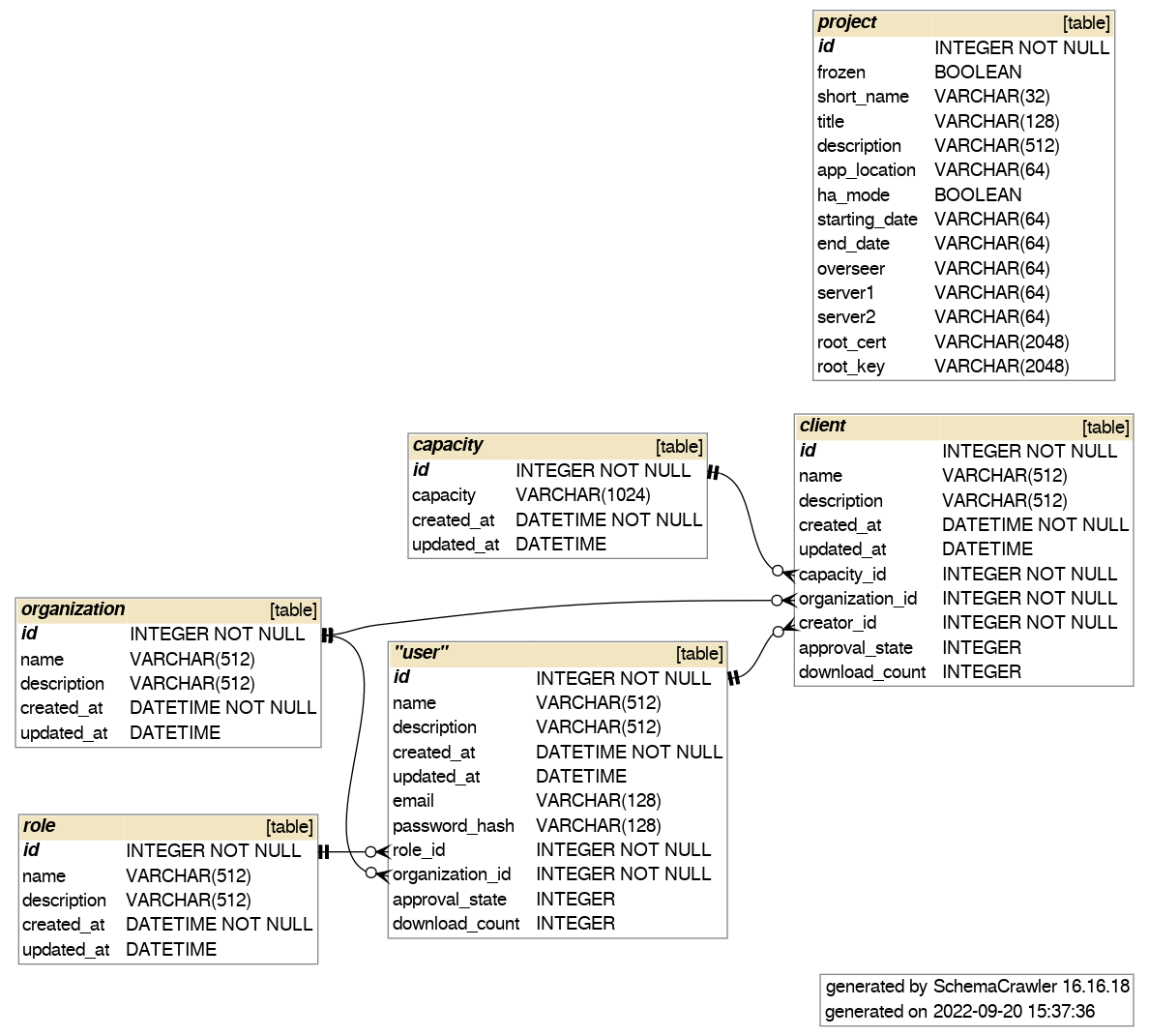
Database schema
The following is the schema of the underlying database used by the backend API.